Android
- Android 9.0 or newer recommended
- Chrome 90+ or Firefox 88+ for best performance
- Stable 4G, 5G, or Wi-Fi connection for live dealer streaming
App at Spinit Casino in Australia: No Download Needed
The full Spinit experience on your phone. No download required, no app store waiting, just open the site on Android or iOS and play instantly.
Casino in Your Pocket
The full Spinit experience on your phone. No download required, no app store waiting, just open the site on Android or iOS and play instantly.
Launch on Mobile Play must be 18 or older. Gambling involves risk and can become addictive, and all bonus offers are subject to terms and conditions.
How to Set Up Spinit on Your Phone
Device Requirements
Android
iOS
Mobile Experience at a Glance
Pros
Cons
Mobile Account Security
What You Should Do
What You Should Avoid
Why Play Spinit on Mobile
Full Library on Any Screen
All 9,000+ pokies, live dealer tables, sportsbook markets, and the complete cashier are available through the mobile browser on Android and iOS without a single download.
PayID Deposits in Seconds
Fund your account through the mobile cashier using PayID, Neosurf, Visa, or cryptocurrency. Deposits clear instantly and you are in the game within moments.
Biometric and 2FA Login
Browsers on modern iPhones and Android devices support Face ID, Touch ID, and saved credential autofill, while 2FA via SMS or authenticator app protects your account.
The Spinit mobile experience delivers the complete platform through a browser rather than a downloaded app, which means every update to the game library, cashier, or promotions appears instantly without any manual update process. On a modern mid-range handset over a 4G or 5G connection, the mobile site loads sharply and maintains smooth performance across pokies, live dealer streams, and sportsbook betting.
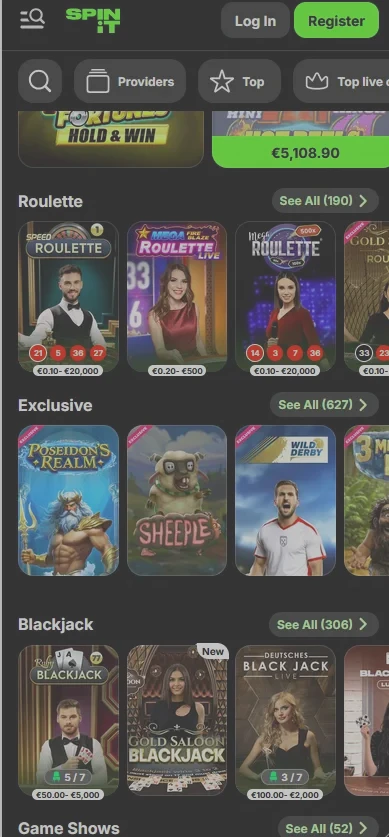
The mobile lobby is organised into the same five sections as desktop: Casino, Live Casino, Sports, Exclusive Games, and Instant Games. The search bar and provider filter remain accessible at the top of the screen, so finding a specific pokie from Pragmatic Play, Hacksaw Gaming, or Nolimit City takes a few seconds rather than scrolling through thousands of titles. The cashier is fully integrated and supports every payment method available on desktop, including PayID, Neosurf, Visa, Mastercard, and the full range of cryptocurrency options. Bonus activation, wagering progress tracking, account verification document uploads, and VIP status management are all available without leaving the mobile interface.
The mobile experience is functionally identical to the desktop version, with a few layout adaptations for smaller screens. Game tiles reorganise into a two-column grid rather than a multi-column row. Navigation menus collapse into a side panel that opens with a tap rather than sitting permanently visible across the top. Live dealer tables from Evolution Gaming adapt their video player to portrait or landscape orientation depending on your device. The only meaningful difference is the absence of push notifications for new promotions, which native apps typically provide. Players who want to stay informed about new offers can enable email or SMS marketing preferences in account settings to receive these instead.
The full 9,000-plus game catalogue is available through the mobile browser without any compromise to the selection or game quality.
All pokies in the Spinit catalogue are built in HTML5, which means they render at full resolution on phone and tablet screens without requiring any additional software. This includes Megaways titles such as Gonzo’s Quest Megaways from NetEnt, high-volatility bonus-buy slots like Gates of Olympus 1000 from Pragmatic Play (RTP 96.50%) and Duel at Dawn from Hacksaw Gaming (RTP 96.00%), and cluster-pay formats like Stockholm Syndrome from Nolimit City (RTP 96.06%). Demo mode is available on most titles, letting players try a game in free-play before staking real money. Swipe gestures work naturally on the spin button and bet controls, making mobile pokie sessions as fluid as a desktop experience.

Live dealer tables from Evolution Gaming, Pragmatic Play Live, Ezugi, and OnAir Entertainment stream in HD directly through the mobile browser. Crazy Time, Lightning Roulette, Speed Baccarat, and Monopoly Big Baller all run without buffering on stable 4G or Wi-Fi. The live table interface scales automatically to your screen size, keeping the video feed, bet panel, and chat box visible simultaneously in landscape orientation. Over 400 live tables are available, including blackjack, roulette, baccarat, poker, and game shows. Bet limits are identical to desktop, so VIP accounts can access high-stakes tables on mobile without restriction.
Over 240 RNG table games are available on mobile, including European Roulette, 21 Burn Blackjack, Caribbean Poker, and multiple baccarat variants. These load in under three seconds on a modern handset and use touch-optimised controls for bet placement, card actions, and chip selection.
Progressive jackpot pokies are fully playable on mobile, with prize counters displaying in real time. The jackpot section groups progressive network titles alongside fixed-prize games, and all contribute to the same prize pools as desktop play.
Spinit does not distribute an APK file for Android or a downloadable package for iOS. The installation process consists of adding a PWA shortcut to your home screen, which takes under 30 seconds.
Open Chrome on your Android phone and navigate to the Spinit site. Tap the three-dot menu icon in the top-right corner of the browser. Select Add to Home Screen from the menu, or if Chrome detects the site as a PWA, select Install App from the banner that appears at the bottom of the screen. Tap Add or Install to confirm. The Spinit icon appears on your home screen and app drawer. Tap it to launch the site in a full-screen view without the Chrome navigation bar. Log in or register and proceed to the cashier.
Open Safari on your iPhone or iPad and navigate to the Spinit site. Tap the Share icon at the bottom of the Safari toolbar (the square with an upward arrow). Scroll down the share sheet and tap Add to Home Screen. Edit the shortcut name if you like, then tap Add in the top-right corner. The Spinit icon appears on your home screen. Tap it to open the site in full-screen mode. Log in or register and proceed to the cashier. Note that the PWA shortcut on iOS uses Safari under the hood, so cookies and saved passwords from your Safari session carry across.
If Chrome or Safari prompts you to install the Spinit shortcut automatically when you visit the site, accept it. The result is the same as following the manual steps above. The shortcut does not consume meaningful storage on your device and can be removed at any time by pressing and holding the icon and selecting Remove or Delete, just like any other app.
The mobile cashier at Spinit replicates the desktop banking experience exactly, with every payment method available from your phone or tablet.
| Method | Min. deposit | Deposit time | Withdrawal time |
|---|---|---|---|
| PayID | $20 | Instant | Via bank transfer (3-5 days) |
| Neosurf | $15 | Instant | Not available for withdrawal |
| Visa / Mastercard debit | $20 | Instant | 1-3 business days |
| Skrill / Neteller | $15 | Instant | Up to 24 hours |
| Bitcoin | $45 | Near-instant | 10-60 minutes after approval |
| Ethereum / Litecoin / USDT | $45 | Near-instant | 10-60 minutes after approval |
| Bank transfer | $30 | 1-2 business days | 3-5 business days |
All transactions are denominated in AUD. There are no operator-side deposit fees, although blockchain network fees apply to cryptocurrency transactions.
Casino finance review adds up to 72 hours to withdrawal processing before the payment method’s own timeframe begins. Cryptocurrency withdrawals are the fastest available option once the review clears, typically settling in under an hour. Card withdrawals are subject to the issuing bank’s processing schedule in addition to the casino’s review. KYC verification must be completed before any withdrawal is processed, regardless of method.
Every cashier session on mobile travels through the same 256-bit SSL encryption as desktop. PCI-compliant processing applies to all card transactions. Cryptocurrency withdrawals go to the same wallet address used for the original deposit, which Spinit verifies during KYC as an anti-fraud measure. Two-factor authentication on your Spinit account also protects the cashier, meaning no withdrawal request can be submitted from your account without passing the second verification step.
Both processes work identically on mobile and desktop.
Tap the Register button at the top of the mobile homepage. Confirm you are 18 or older and choose a welcome bonus, then fill in your email, password, name, date of birth, country (Australia), and preferred currency (AUD). Verify your email through the confirmation link. Your account is immediately active for browsing and demo play. Make a qualifying deposit to unlock real-money gaming and the welcome bonus.
Tap Log In at the top of the mobile homepage and enter your email and password. Browser autofill and biometric authentication (Face ID or Touch ID) speed up repeat sign-ins on the same device. FunID users can authenticate with a single tap without entering credentials manually. If you are accessing Spinit from a new device or browser, a 2FA code will be required if two-factor authentication is enabled. For account access troubleshooting, see the login guide.
Every bonus available on desktop is claimable from the mobile interface, with no separate mobile-specific codes or activation steps required.
The casino welcome package of 100% up to $750 plus 200 Free Spins and a Bonus Crab pick is available to new players who register and make a first qualifying deposit of $30 or more through the mobile site. The bonus activates automatically once the deposit clears. Wagering is 35x on the deposit plus bonus, and free spin winnings carry a 40x requirement to be completed within 10 days. The maximum bet during active wagering is $150. Full terms are on the bonus page. 18+ only. Terms and conditions apply.
All communication between your mobile device and the Spinit platform uses 256-bit SSL encryption, the same standard applied by major Australian financial institutions. This covers the game lobby, cashier, account management, and live dealer streams. Certificate validity can be verified by tapping the padlock icon in your browser’s address bar before logging in.
Two-factor authentication is available for all Spinit accounts and is activated through the security settings inside your profile. Once enabled, every sign-in from any device requires a one-time code sent via SMS or generated by an authenticator app such as Google Authenticator. This prevents unauthorised access even if your password is obtained elsewhere.
Modern iPhones and Android phones can store your Spinit login credentials in the device’s secure enclave, protected by Face ID or Touch ID. When enabled in your browser’s password manager settings, biometric login replaces manual password entry while keeping credentials encrypted on your device.
Live chat is accessible directly from the mobile interface via the help widget visible on every page, including mid-game. Agents respond within minutes during normal operation, covering Australian time zones AEST and AEDT. Email at [email protected] is available for queries that benefit from a documented trail, such as verification document submissions or payment disputes. Responses arrive within 12 to 24 hours. The self-service Help Centre lists solutions to the most common mobile issues, including browser compatibility, cashier loading errors, and bonus activation steps.
Spinit’s responsible gambling tools are available on mobile with the same ease of access as desktop. Deposit limits, loss limits, wager limits, session time reminders, cooling-off periods, and self-exclusion are all manageable from your account settings without contacting support. If you feel that your gambling is causing concern, use these tools or contact the support team directly. Minimum age for play is 18 across all of Australia.
Spinit’s mobile platform is built on HTML5 and designed to run in any modern browser, making it compatible with the widest possible range of devices without requiring specific hardware.
Android 9.0 or newer is recommended. The majority of Android handsets manufactured from 2019 onwards meet this requirement. On devices running Android 9.0 or above, the full game library loads correctly, live dealer streams play without buffering on a stable 4G or Wi-Fi connection, and the cashier processes all payment methods without issue. On older Android versions, performance may degrade on high-resolution pokies and live casino titles.
iOS 14.0 or newer is recommended, covering iPhones from the iPhone 6s onwards. Safari is the required browser for the Add to Home Screen PWA shortcut on iOS. Chrome for iOS can also be used for general browsing and gameplay but does not support the native PWA installation. Older iOS versions may encounter compatibility issues with certain live casino features.
| Feature | Android | iOS |
|---|---|---|
| OS version | 9.0+ | 14.0+ |
| Recommended browser | Chrome 90+ | Safari 14+ |
| Live dealer streaming | Stable 4G / Wi-Fi | Stable 4G / Wi-Fi |
| PWA shortcut support | Chrome (via menu) | Safari (via Share) |
| Biometric login | Face Unlock / Fingerprint | Face ID / Touch ID |
Mobile Questions Answered
No. Spinit does not have a native app available on Google Play or the App Store. The full casino experience is delivered through the optimised mobile browser, and adding the site to your home screen creates a PWA shortcut that behaves like a native app.
Android 9.0 or newer is recommended for the best experience, including smooth loading of live dealer streams from Evolution Gaming and Pragmatic Play Live. Older versions may encounter performance issues with high-resolution games and the live casino section.
Yes. The entire registration and bonus claiming process, including selecting the welcome offer, making a qualifying deposit of $30 or more via PayID or another method, and activating the bonus, works identically from a mobile browser as it does on desktop.
Start Playing on Mobile Today
Grab 100% up to A$750 and 200 free spins.
Enter the Casino Play must be 18 or older. Gambling involves risk and can become addictive, and all bonus offers are subject to terms and conditions.